Piso WiFi Vendo: Machine Price, Setup & How It Works (2026)
A Piso WiFi vendo is a machine that sells internet access for small payments, often starting at ₱1. Customers connect to its WiFi network, add credits, and receive internet time based on the rates set by the owner.
These machines are commonly found near homes, sari-sari stores, boarding houses, and other places where people need affordable internet access.
If you’re planning to buy a Piso WiFi vendo machine, you’ll need to understand its hardware, software, internet requirements, and operating costs. If you’re a customer, you’ll want to know how to connect and use your purchased time.
This guide explains how a WiFi vendo works, machine price examples in the Philippines, the equipment needed, basic setup steps, and how to estimate business earnings.
What Is a Piso WiFi Vendo?
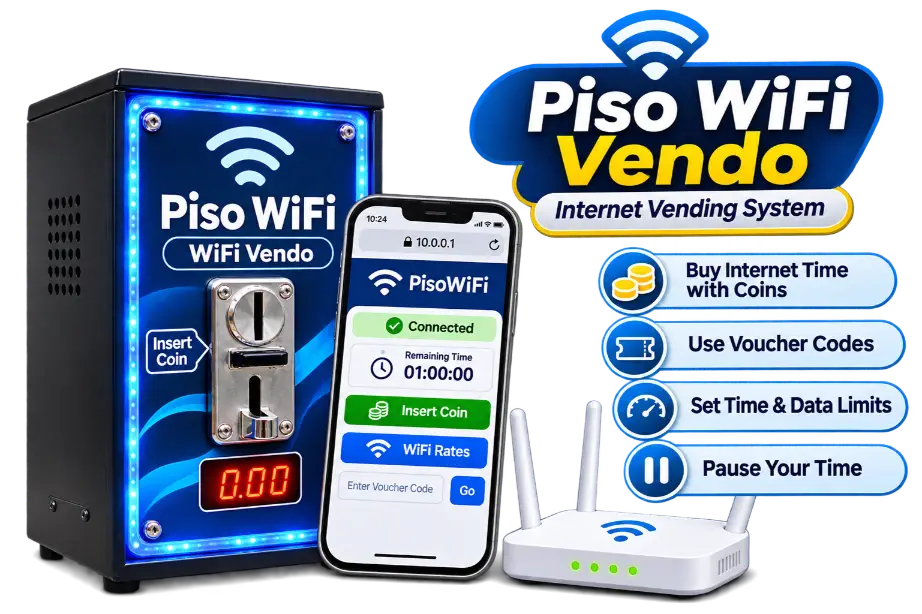
A Piso WiFi vendo is an internet vending system that lets people purchase WiFi access through a payment mechanism, such as a coin acceptor.The word vendo comes from vending machine. Instead of selling drinks or snacks, the machine sells internet access.
A typical setup combines a router or controller, WiFi equipment, payment hardware, management software, and an internet connection.The software controls how much internet time customers receive after payment. For example, an owner might offer 10 minutes for ₱1. Actual rates depend on the machine’s settings.
How Does a Piso WiFi Vendo Work?
The process is simple:
Some systems also offer vouchers, speed limits, data allowances, and Pause Time. These features are not available on every machine.
Where Are Piso WiFi Vendo Machines Used?
You may find WiFi vendo machines in residential neighborhoods, sari-sari stores, boarding houses, small community shops, and waiting areas.A suitable location should have reliable internet, stable electricity, potential customers, and a secure place for the equipment.However, a busy location does not automatically guarantee profit. Competition, operating costs, and actual customer demand also matter.
What Is Inside a Piso WiFi Vendo Machine?
A Piso WiFi vendo uses several components that work together to accept payments and provide internet access.The exact parts depend on the supplier, controller board, and software platform.
Main Hardware Components
Component | What It Does |
|---|---|
Router or controller | Manages network traffic and customer access |
Coin acceptor | Detects supported coin payments |
WiFi access point | Provides wireless coverage |
Power supply | Powers the equipment |
Enclosure or casing | Protects internal components |
Internet connection | Supplies internet access |
Cables and connectors | Connect hardware and network devices |
Software or firmware | Controls rates, sessions, and payments |
Some systems combine several functions into one device. Others use separate controllers, routers, and access points.Outdoor installations may need weather protection, mounting equipment, and additional network hardware.
Piso WiFi Vendo Software
The hardware alone does not manage paid internet sessions. Compatible management software is also needed.Common options include LPB, AdoPiSoft, and JuanFi-based systems.
Different platforms may have different controller requirements, payment integrations, licensing terms, and management features.Before buying, confirm that the software supports the exact hardware included in your machine.
What Specifications Should You Check?
Ask the supplier about:
Don’t rely only on advertising claims such as high-speed WiFi or 200 users supported. Actual performance depends on the equipment, internet bandwidth, interference, and customer activity.
Piso WiFi Vendo Price in the Philippines (2026)
Piso WiFi vendo machines can cost around ₱5,700 for an advertised DIY kit and ₱14,999 for an assembled vending machine in the supplier examples below. Other configurations may cost less or more.
The price depends on the included hardware, software license, WiFi equipment, enclosure, and installation services.
Philippine Supplier Price Examples
Supplier | Product | Advertised Price | Listed Inclusions or Details |
|---|---|---|---|
SmartFi Shop | Router-based DIY kit | ₱5,700 | Ruijie dual-band router, coin slot, controller board, cables, power supply, SmartFi license |
Aera Computer Center | Piso WiFi Regular | ₱8,299 selected variation | Vendo machine, antenna according to selected variation, software license, coin acceptor, controller components |
Flarego Online Store | Piso WiFi vending machine | ₱14,999 | Assembled vending machine listing; confirm full package contents |
Flarego Online Store | Wireless sub-vendo kit | ₱1,949 | Additional sub-vendo equipment, not a complete standalone machine |
Complete Machine vs. DIY Kit
Option | Main Advantage | Main Consideration |
|---|---|---|
DIY kit | More control over components and configuration | Requires assembly and technical knowledge |
Pre-assembled machine | Less assembly work | Confirm what is included |
Complete installed package | May include setup and testing | Installation and support can increase the cost |
Used machine | May cost less upfront | Greater risk of worn parts and license problems |
A complete machine is often more convenient for beginners. A DIY kit may be suitable if you’re comfortable with routers, wiring, and network configuration.
What Does the Advertised Price Include?
Two machines with similar prices may contain different equipment.Before paying, ask whether the package includes:
A listing described as a complete set does not necessarily include an internet subscription or installation service.
Additional Setup and Operating Costs
The machine price is only part of your investment.
| Expense | When It Applies |
|---|---|
| Internet subscription | Usually monthly |
| Electricity | Ongoing |
| Software license | Initial or recurring, depending on the platform |
| Installation | Initial setup or relocation |
| Maintenance | As needed |
| Replacement parts | When components fail |
| Location rent or revenue sharing | If required by the property owner |
Compare the full setup cost instead of choosing only the lowest advertised machine price.
What Do You Need to Start a Piso WiFi Vendo Business?
Starting a Piso WiFi vendo business requires more than purchasing a machine.You need a suitable location, reliable internet, compatible equipment, and a plan for maintaining the service.
1. A Reliable Internet Connection
The vendo needs internet access from an internet service provider (ISP).Fiber can be a suitable option where available because it often provides stable speeds and enough bandwidth for multiple customers. Other connection types may also work, depending on reliability and capacity.Before operating a paid public WiFi service, contact your internet provider and confirm that your subscription permits this use. Do not assume a residential fiber plan allows commercial internet resale. Ask about business plans or approved public hotspot arrangements.
2. A Suitable Location
Choose a place with potential demand for affordable WiFi.Consider nearby customers, existing vendo machines, network coverage, electricity access, and equipment security.Test the signal in the areas customers are expected to use.
3. Compatible Hardware and Software
Your controller, router, payment mechanism, and management software must work together.Ask your supplier for a complete compatibility list before purchasing components separately.
4. Power and Physical Security
Install the equipment in a dry, secure, and well-ventilated location.Protect cables and power connections from damage. Outdoor equipment should be suitable for the environment.
5. An Operating Budget
Plan for internet bills, electricity, maintenance, and unexpected repairs.You should also check applicable local business registration and permit requirements before operating.
How to Set Up a Piso WiFi Vendo Machine
The exact installation process depends on the machine and software you purchase.The following steps provide a general overview.
Step 1: Choose the Installation Location
Select a secure location with reliable electricity and internet access.Check where customers will use the WiFi and whether the signal can reach those areas.
Step 2: Inspect the Machine and Components
Confirm that all purchased parts are included and undamaged.Compare the equipment against the supplier’s packing list.
Step 3: Connect the Internet Source
Connect the ISP’s modem or router to the supported network equipment according to the manufacturer’s instructions.Confirm that the internet connection works before configuring paid access.
Step 4: Install the WiFi Equipment
Connect and position the access point or wireless router.Check signal strength in the intended customer area.
Step 5: Connect the Payment Hardware
Install the coin acceptor or other supported payment device using the correct wiring instructions.Incorrect wiring can damage components. Follow the manufacturer’s instructions rather than guessing connections.
Step 6: Configure the Software
Follow the official setup instructions for your chosen platform.Depending on the system, this may include activating a license, registering hardware, and configuring network settings.
Step 7: Set Rates and Session Rules
Choose the available internet packages.For example:
| Payment | Example Internet Time |
|---|---|
| ₱1 | 10 minutes |
| ₱5 | ₱5 |
| ₱10 | 2 hours |
Step 8: Test the Customer Portal
Connect a phone to the vendo’s WiFi network.Check whether the customer portal opens correctly and displays payment options.
Step 9: Test Payment Recognition
Insert a supported coin or use another configured payment method.Confirm that the system records the correct amount and adds the expected internet allowance.
Step 10: Test the Internet Session
Open a website and check whether the connection works.Test with more than one device if possible.Confirm that access ends or changes correctly when the purchased allowance runs out.
Important: These are general setup steps. Always follow the official wiring, installation, and configuration instructions for your exact machine.
How Customers Connect to Piso WiFi Vendo
Customers normally connect through the machine’s WiFi network rather than installing a separate application.To get started:
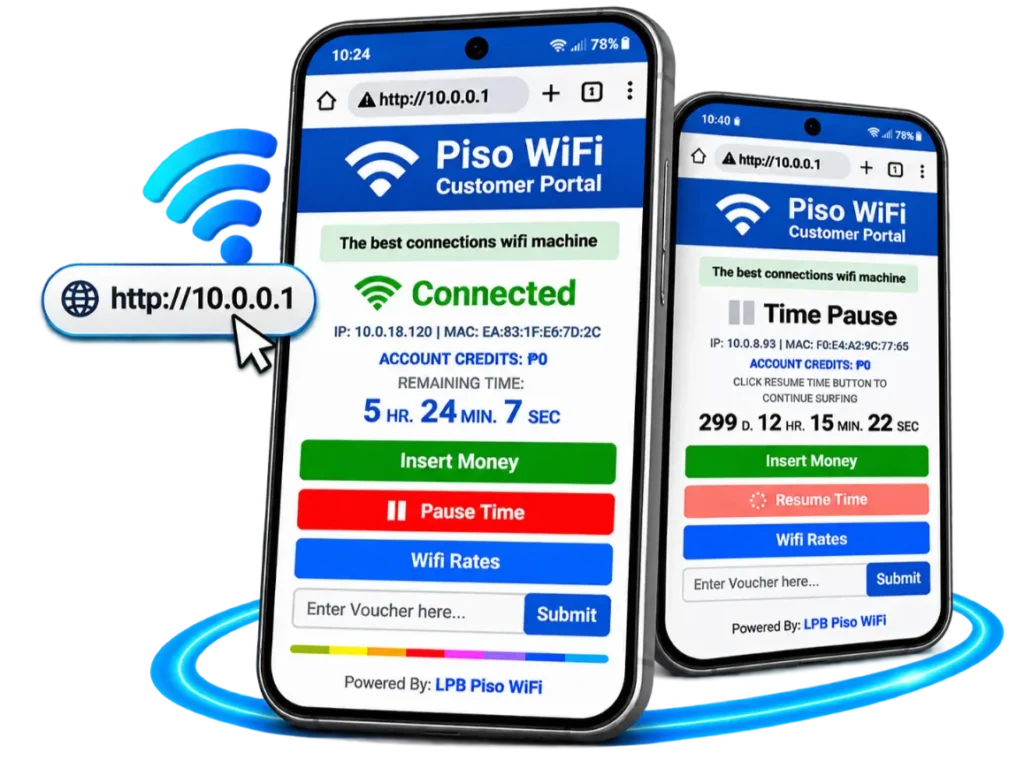
Some machines use http://10.0.0.1 as their local customer portal address.However, 10.0.0.1 is not universal. Your machine may use a different address.For detailed customer access instructions, read our Piso WiFi login guide.
Can You Pause Piso WiFi Vendo Time?
Some machines let customers pause their remaining internet time.When this feature is enabled, customers may see a Pause option in the portal and a Resume option when they return.However, pausing may not stop a separate session-expiration timer.
For the full process and important limitations, visit our Piso WiFi Pause Time homepage.If you want quicker portal access from your phone, our Piso WiFi app guide explains official apps and browser shortcuts.
LPB vs. AdoPiSoft for Piso WiFi Vendo
LPB and AdoPiSoft are software options used with supported Piso WiFi vending systems.Both help operators manage paid internet access, but their hardware requirements, licensing terms, configuration methods, and management tools differ.
What to Compare | LPB | AdoPiSoft |
|---|---|---|
Main purpose | Paid WiFi vending management | Paid WiFi vending management |
Hardware | Requires compatible LPB setup | Requires compatible AdoPiSoft setup |
Customer portal | Available on supported setups | Available on supported setups |
Rate management | Supported | Supported |
Licensing | Verify current LPB terms | Verify current AdoPiSoft terms |
Management tools | LPB-specific owner features | AdoPiSoft-specific owner features |
Best suited for | Buyers whose equipment and requirements match LPB | Buyers whose equipment and requirements match AdoPiSoft |
Which Software Should You Choose?
Don’t select software based only on popularity or advertising claims.Instead, compare four practical factors:
The better option is the one that works reliably with your equipment and business requirements.For platform-specific information, read our LPB Piso WiFi guide and AdoPiSoft Piso WiFi guide. Machine owners can also explore our Piso WiFi admin guide for an introduction to administrator access and settings.
Piso WiFi Vendo Business: Rates, Revenue & Profit
A Piso WiFi vendo can generate revenue from customers purchasing internet access.However, revenue is not the same as profit.Your earnings depend on how many people use the machine, how much they spend, and the cost of operating it.
Example Monthly Revenue Calculation
Suppose a machine collects an average of ₱100 per day.
| Calculation | Amount |
|---|---|
| Average daily collections | ₱100 |
| Days in example month | 30 |
| Monthly gross revenue | ₱3,000 |
Now suppose the owner has these monthly expenses:
| Expense | Example Amount |
|---|---|
| Internet subscription | ₱1,500 |
| Electricity | ₱200 |
| Maintenance allowance | ₱300 |
| Total operating expenses | ₱2,000 |
In this example:
₱3,000 gross revenue − ₱2,000 operating expenses = ₱1,000 monthly operating surplus.
If collections are lower or costs are higher, the business could lose money.This is a hypothetical calculation, not an earnings forecast. It excludes taxes, financing, depreciation, location fees, and other possible expenses.
How Long Does It Take to Recover Your Investment?
You can estimate a simple investment recovery period by dividing your initial investment by your monthly operating surplus.
Suppose:
| Item | Hypothetical Amount |
|---|---|
| Initial machine investment | ₱8,000 |
| Monthly operating surplus | ₱1,000 |
| Estimated recovery period | 8 months |
₱8,000 ÷ ₱1,000 = 8 months
This example assumes the same monthly surplus continues without unexpected costs.Actual recovery may take longer, or the investment may never be fully recovered. Customer demand, downtime, repairs, extra expenses, and changes in internet costs can affect the result.
What Affects Piso WiFi Vendo Earnings?
The main factors include:
A useful approach is to estimate your monthly break-even point before buying.For example, if monthly operating costs are ₱2,000, the machine needs to collect at least ₱2,000 to cover those costs. Recovering the initial investment requires additional surplus over time.
What to Check Before Buying a Piso WiFi Vendo
A machine that looks affordable may become expensive if it needs missing parts, software activation, or repairs.
Hardware and Compatibility
Confirm the exact router, controller, coin acceptor, and access point models.Ask whether replacement parts are available.
Software License
Check whether the license is included, active, and tied to specific hardware.For used machines, ask whether the license can legally be transferred.
Internet and User Capacity
Ask the supplier what internet speeds and equipment are recommended for your expected number of customers.Avoid treating advertised maximum user counts as guaranteed performance.
Warranty and Support
Confirm the warranty period, exclusions, return policy, and available technical assistance.Ask who handles software and hardware problems after installation.
Used Machine Condition
If you’re buying a second-hand unit, test the coin acceptor, controller, WiFi signal, and power supply.Check for damaged wiring, corrosion, overheating, and missing components.Request proof that the management software can still be activated and used.
Common Piso WiFi Vendo Problems and Fixes
A vendo machine may experience payment, WiFi, internet, or hardware problems.Here are the first things to check.
Problem | What to Check |
|---|---|
WiFi network not showing | Access point power, settings, and connections |
Coin not detected | Coin acceptor, supported coins, wiring, and configuration |
Payment accepted but no time added | Payment integration, software settings, and session records |
Connected but no internet | ISP connection, router status, and active session |
Customer portal not opening | Correct network and portal address |
Slow internet | Bandwidth, signal strength, congestion, and user limits |
Machine restarting | Power supply, overheating, and hardware condition |
What If 10.0.0.1 Doesn’t Open?
First, confirm that you’re connected to the correct vendo network.Then check whether the machine actually uses 10.0.0.1.Some machines use another local portal address, so don’t assume that every installation has the same gateway.If the address is correct but the portal still fails, the machine may have a local network or software problem.
What If the Coin Acceptor Stops Working?
Check whether the coin is supported and whether the acceptor is blocked or dirty.The owner should also inspect the device’s configuration and connections according to the supplier’s instructions.Disconnect power before performing hardware maintenance where required.Do not attempt repairs involving exposed electrical connections unless you’re qualified to do so.
Piso WiFi Vendo Maintenance Tips
Regular maintenance helps reduce downtime and equipment problems.
Daily or Frequent Checks
- Confirm that the WiFi network is available.
- Check that customers can open the portal.
- Test payment recognition when appropriate.
- Watch for connection problems.
- Check that the machine is physically secure.
Periodic Maintenance
- Clean the coin acceptor according to its instructions.
- Inspect cables and connectors.
- Check ventilation and signs of overheating.
- Review software updates from the official provider.
- Back up settings when supported.
- Check internet usage and service costs.
Keep records of repairs, expenses, and collections.These records can help you decide whether the machine is worth maintaining or upgrading.
Is a Piso WiFi Vendo Right for Your Location?
Before investing, consider these questions:
If you cannot answer these questions yet, research the location and request supplier quotations before purchasing.
Frequently Asked Questions
Final Thoughts
A Piso WiFi vendo can provide affordable, pay-per-use internet access while giving owners a way to manage paid WiFi sessions.For buyers, the most important steps are choosing compatible equipment, understanding the full setup cost, checking software licensing, and estimating realistic operating expenses.
For customers, using a vendo is usually simple: connect to its WiFi network, open the payment portal, and purchase internet time.Before buying or operating a machine, compare suppliers, confirm the internet service terms, and test the equipment carefully. A reliable setup and suitable location matter more than promises of high earnings.